FindEC2Capacity_ODCR.ps1
Creates On-Demand Capacity Reservations (ODCR) for a specified EC2 instance type.
You can then launch instances into the capacity reservation, stop or terminate, and launch new instances into the ODCR without losing the reserved capacity.
⚠️ Billing: You are billed at the on-demand rate from the moment the ODCR is created, even if no instance is running in it. Cancel the ODCR when done.
⚠️ Scope is required: In parallel mode (the default), the script attempts to create an ODCR in every AZ of the chosen scope at once. To avoid accidentally reserving excessive capacity across all regions, you must specify
-Region,-Zone, or-RegionGroupexplicitly — there is no implicit default.
Requirements
- PowerShell 7+ (pre-installed in AWS CloudShell)
- AWS.Tools.EC2 and AWS.Tools.Pricing modules (pre-installed in AWS CloudShell)
- AWS credentials with EC2 capacity reservation permissions
Quick Start (AWS CloudShell)
- Open CloudShell in the AWS Console
- Launch PowerShell 7:
pwsh - Download the script into CloudShell:
Invoke-WebRequest `
  -Uri "https://raw.githubusercontent.com/aws-samples/technical-notes-for-microsoft-workloads-on-aws/main/docusaurus/docs/Code%20Repo/FindEC2Capacity_ODCR/Scripts/FindEC2Capacity_ODCR.ps1" `
  -OutFile FindEC2Capacity_ODCR.ps1
- Run
.\FindEC2Capacity_ODCR.ps1with the desired parameters. For example:
.\FindEC2Capacity_ODCR.ps1 -OS Windows -InstanceType g7e.2xlarge -RegionGroup us
Parameters
| Parameter | Default | Description |
|---|---|---|
-InstanceType | (required) | EC2 instance type to reserve |
-OS | (required) | Reservation platform, matching the AWS API. Accepts Windows, Ubuntu Pro, Red Hat Enterprise Linux, SUSE Linux, plus the SQL Server and RHEL HA variants. Linux is a friendly alias for Linux/UNIX. Quote values that contain spaces, e.g. -OS "Ubuntu Pro". Matching is case-insensitive, and the valid list is queried live from the EC2 SDK so it stays in sync with AWS. |
-RegionGroup | (none) | us, us+ (Americas), eu, ap, or all. Must be set explicitly — there is no implicit default, since the script creates billable reservations. Use one of -RegionGroup, -Region, or -Zone. |
-Region | (none) | Specific region(s) to try (overrides -RegionGroup). Multiple: us-east-1,us-east-2 (no spaces) |
-Zone | (none) | Specific AZ(s) to try. Accepts names (us-east-1a,us-east-2b) or zone IDs (use1-az1,use2-az2). Overrides -Region/-RegionGroup. |
-Quantity | 1 | Slots per single ODCR request. In -TargetQuantity mode, this is the increment size for each expansion attempt. |
-TargetQuantity | (none) | Total slots to accumulate across AZs (with retries). Unlike -Quantity which is per-request, this is the overall target. Requires -Region or -Zone. |
-TargetTimeout | 0 | Max minutes to spend accumulating capacity in -TargetQuantity mode. Accepts decimals (0.5 = 30s). 0 (default) = single run (one sweep, no retry); e.g. 5 retries for 5 minutes. |
-TargetQuantityInterval | 1 | Minutes to wait between retry attempts in -TargetQuantity mode. Accepts decimals (0.5 = 30s); use 0 to retry back-to-back with no wait. |
-CapacityReservationId | (none) | Expand a specific existing CR directly, skipping region/AZ discovery. Requires -TargetQuantity (the size to grow to) and -Region (the CR's region). |
-InstanceMatchCriteria | open | open (any matching instance uses the reservation) or targeted (must specify CR ID at launch) |
-Sequential | (off) | Tries AZs one at a time, stops on first success |
Examples
Single Run (default: parallel, or -Sequential)
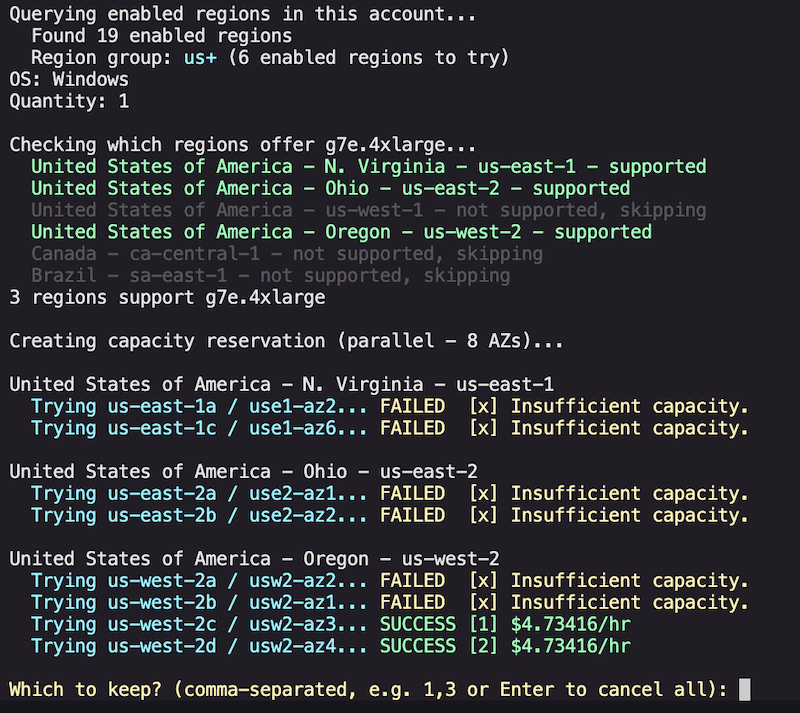
Find capacity and create a single ODCR. Parallel mode tries all AZs at once and lets you pick; sequential stops on first success.
# Reserve Windows g7e capacity - check all US regions (parallel)
.\FindEC2Capacity_ODCR.ps1 -OS Windows -InstanceType g7e.2xlarge -RegionGroup us

# Reserve Windows p5 capacity - check all regions
.\FindEC2Capacity_ODCR.ps1 -OS Windows -InstanceType p5.4xlarge -RegionGroup all

# Reserve 4 Linux i4i.metal slots in us-east-1 or us-east-2
.\FindEC2Capacity_ODCR.ps1 -OS Linux -InstanceType i4i.metal -Quantity 4 -Region us-east-1,us-east-2

# Reserve an Ubuntu Pro instance (quote platform values that contain spaces)
.\FindEC2Capacity_ODCR.ps1 -OS "Ubuntu Pro" -InstanceType g6e.2xlarge -Region us-east-2

# Sequential mode - stops on first success (EU regions)
.\FindEC2Capacity_ODCR.ps1 -OS Windows -InstanceType g7e.4xlarge -RegionGroup eu -Sequential

# Target specific AZs by name
.\FindEC2Capacity_ODCR.ps1 -OS Windows -InstanceType g7e.2xlarge -Zone us-east-1a,us-east-2a

# Target specific AZs by zone ID
.\FindEC2Capacity_ODCR.ps1 -OS Linux -InstanceType p5.4xlarge -Zone use1-az1,use2-az1

# Reserve capacity only a specifically-targeted launch can use (targeted match criteria)
.\FindEC2Capacity_ODCR.ps1 -OS Linux -InstanceType g7e.2xlarge -Region us-east-2 -InstanceMatchCriteria targeted
TargetQuantity Mode (-TargetQuantity)
Accumulate a target number of slots by creating and expanding ODCRs. Retries periodically until the target is reached or timeout expires. Useful for scarce instance types where capacity trickles in over time.
# Need 10 g7e.2xlarge in us-east-2. Retry for 10 minutes.
.\FindEC2Capacity_ODCR.ps1 `
    -OS Windows `
    -InstanceType g7e.2xlarge `
    -Region us-east-2 `
    -TargetQuantity 10 `
    -TargetTimeout 10

# Need 4 p5.4xlarge in specific AZs. Retry every 2 min for 5 minutes (raise -TargetTimeout to keep trying longer).
.\FindEC2Capacity_ODCR.ps1 `
    -OS Windows `
    -InstanceType p5.4xlarge `
    -Zone us-east-1a,us-east-2b `
    -TargetQuantity 4 `
    -TargetTimeout 5 `
    -TargetQuantityInterval 2

# Hunt hard for 30 seconds: 0.5 min timeout, re-checking back-to-back (interval 0)
.\FindEC2Capacity_ODCR.ps1 -OS "Ubuntu Pro" -InstanceType g6e.48xlarge -Zone usw2-az1 -TargetQuantity 1 -TargetTimeout 0.5 -TargetQuantityInterval 0

# Expand a specific existing reservation directly to 8 slots
.\FindEC2Capacity_ODCR.ps1 `
    -OS Windows `
    -InstanceType g7e.4xlarge `
    -Region us-east-2 `
    -CapacityReservationId cr-0abc123... `
    -TargetQuantity 8

# DR strategy: reserve 6 g6e.12xlarge per AZ across us-east-1 (one ODCR per AZ).
# Run once per zone to get an even per-AZ spread.
.\FindEC2Capacity_ODCR.ps1 -OS Linux -InstanceType g6e.12xlarge -Zone us-east-1a -TargetQuantity 6 -TargetTimeout 30
.\FindEC2Capacity_ODCR.ps1 -OS Linux -InstanceType g6e.12xlarge -Zone us-east-1b -TargetQuantity 6 -TargetTimeout 30
.\FindEC2Capacity_ODCR.ps1 -OS Linux -InstanceType g6e.12xlarge -Zone us-east-1c -TargetQuantity 6 -TargetTimeout 30
Tip (capacity-per-AZ / DR pattern): To reserve a fixed number of instances in each AZ (rather than a single total spread across AZs), run the script once per zone with
-Zone <one-az>. The script's defaults already match a typical ODCR (openmatch criteria,defaulttenancy, unlimited end date).
After a successful reservation:
Launch instances into the ODCR via the EC2 Console or PowerShell:
New-EC2Instance -Region us-east-2 -InstanceType g7e.2xlarge -CapacityReservationTarget_CapacityReservationId cr-0abc123... ...
Cancel the ODCR when no longer needed (stops reservation billing; running instances continue to bill separately):
Remove-EC2CapacityReservation -CapacityReservationId cr-0abc123... -Region us-east-2 -Force
How It Works
Parallel (default)
- Queries enabled regions in your account
- Builds region groups dynamically by prefix (future-proof for new regions)
- Pre-checks instance type availability per region in parallel
- Queries which AZs support the instance type (in parallel)
- Fires ODCR creation requests across all supported AZs simultaneously
- Displays results grouped by region with on-demand pricing per success
- If more than one AZ succeeds, prompts you to choose which to keep (by number); a lone success is kept automatically
- Automatically cancels any unchosen reservations
- Enter to cancel all, or comma-separated numbers to keep (e.g.
1,3)
Sequential (-Sequential)
- Same region and AZ discovery as parallel
- Tries each AZ one at a time in priority order
- Stops on first success with pricing displayed
- No interactive selection
TargetQuantity mode (-TargetQuantity)
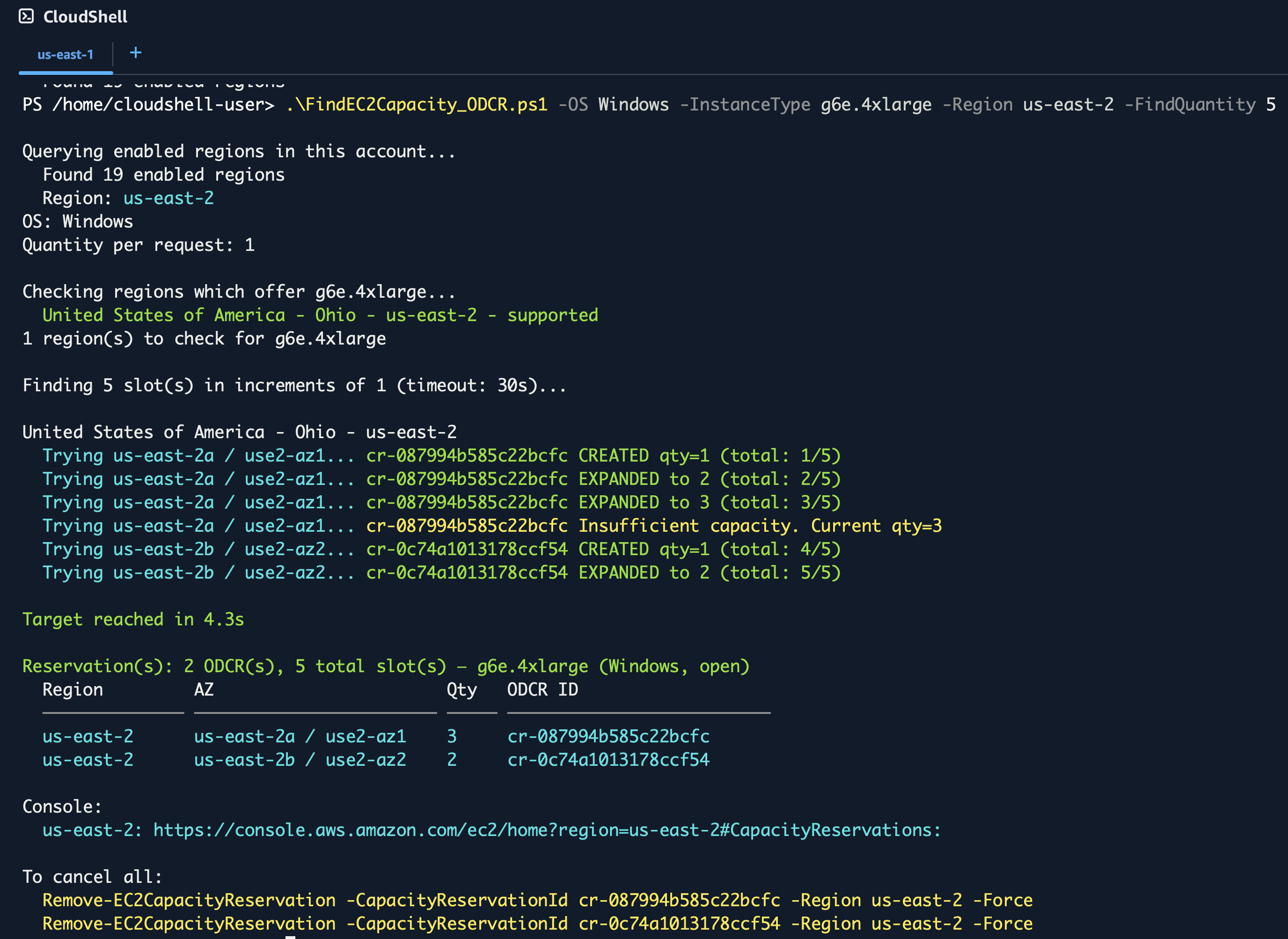
Use when you need a large number of instances (e.g. multiple p5.4xlarge) or want to increase existing Capacity Reservations. The script creates an ODCR (if needed), and increases until the -TargetQuantity value is met or an Insufficient capacity message is returned, and then tries the next AZ. This minimizes the number of Capacity Reservations to manage. Re-running the script expands existing CRs rather than creating duplicates.
- Finds existing active CRs matching the instance type and platform
- Tries expanding existing CRs first (minimizes total reservations)
- If no existing CR in an AZ, creates a new one
- Expands in increments of
-Quantity - Retries all AZs every
-TargetQuantityIntervalminutes (capacity may free up) - Stops when target reached or
-TargetTimeoutexceeded (default0= a single run, no retry)
TargetQuantity Sample Output
.\FindEC2Capacity_ODCR.ps1 -OS Windows -InstanceType g6e.4xlarge -Region us-east-2 -TargetQuantity 5
Finding 5 g6e.4xlarge slots in us-east-2.
Author
Craig Cooley coolcrai@ — Built with Kiro IDE + Claude Opus 4.8